

When you frequently build applications using npm or yarn, you've probably wondered about many things. What is the purpose of package.json? Why do we get package-lock.json when using npm and yarn.lock when using yarn? What's the difference between dependencies and devDependencies? What do those version numbers mean? There are many more questions like these.
Here I will discuss the function and purpose of the numbers and symbols found next to packages in package.json like the image below.

These numbers are called Semantic Versioning or commonly abbreviated as SemVer.
What Do These Numbers Mean?
In SemVer, there are 3 version numbers. Let's say we have a dependency like this: typescript@3.4.5. These numbers indicate what type of changes or updates have been made to that dependency. From left to right, we call these numbers Major, Minor, and Patch.
| Major | Minor | Patch | ||
|---|---|---|---|---|
| 3 | . | 4 | . | 5 |
Usually when we frequently use third-party libraries, we unconsciously pay attention to their version numbers. These numbers tell us what the maintainer has updated. When we create our own library, we also need to pay attention to versioning because versioning has a standard.
How It Works
When we create a library, for example one that will be published to npm, we must think about its version number.
For example, if our package is currently at v0.0.1, then when we publish the next version, we must increase the version number — it must be greater than v0.0.1. We can see our package's version in the package.json file.
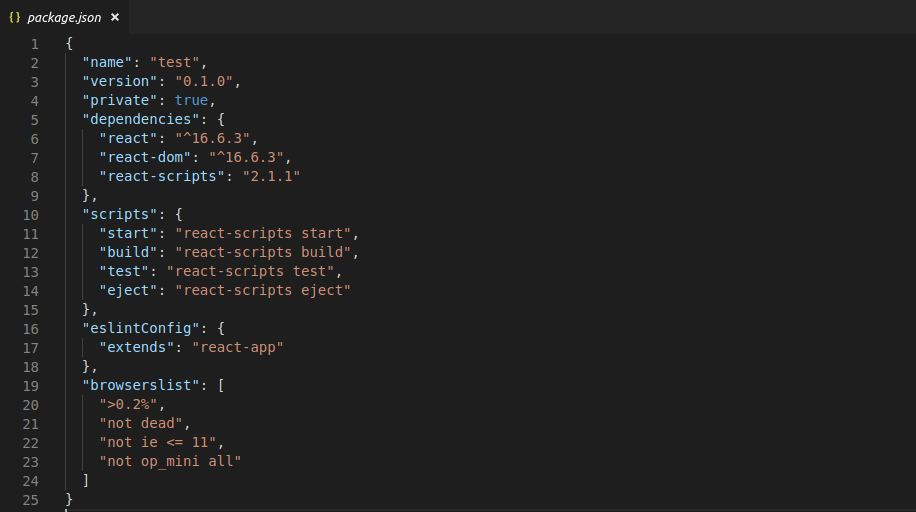
Manually, we would change the version in our package.json file, increment it manually, and then publish manually.
Rather than doing it manually, there are already tools that make it easier to manage your package version and publish to npm.
We can use NP, a package by sindresorhus, to make it easier to maintain our package from version bumping to pushing tags and publishing to npm.


So when we want to publish our package, it becomes easy — everything is already automated by np.
TLDR
Semantic versioning (SemVer) is very important when creating a package because we can see what has changed in that package or library just by looking at the version number alone. For example, in v3.2.1, the leftmost number is major, followed by minor, then patch.
To make it easier to maintain the version of your package or library, you can use the NP package, which can automate tasks from bumping your package version to publishing and creating tags and pushing to GitHub.

